> ## Documentation Index
> Fetch the complete documentation index at: https://bun.com/docs/llms.txt
> Use this file to discover all available pages before exploring further.
# bun install
> Install packages with Bun's fast package manager
## Basic Usage
```bash terminal icon="terminal" theme={"theme":{"light":"github-light","dark":"dracula"}}
bun install react
bun install react@19.1.1 # specific version
bun install react@latest # specific tag
```
The `bun` CLI contains a Node.js-compatible package manager designed to be a dramatically faster replacement for `npm`, `yarn`, and `pnpm`. It's a standalone tool that works in existing Node.js projects; if your project has a `package.json`, you can use `bun install`.
**⚡️ 25x faster** — Switch from `npm install` to `bun install` in any Node.js project to make your installations up to 25x faster.
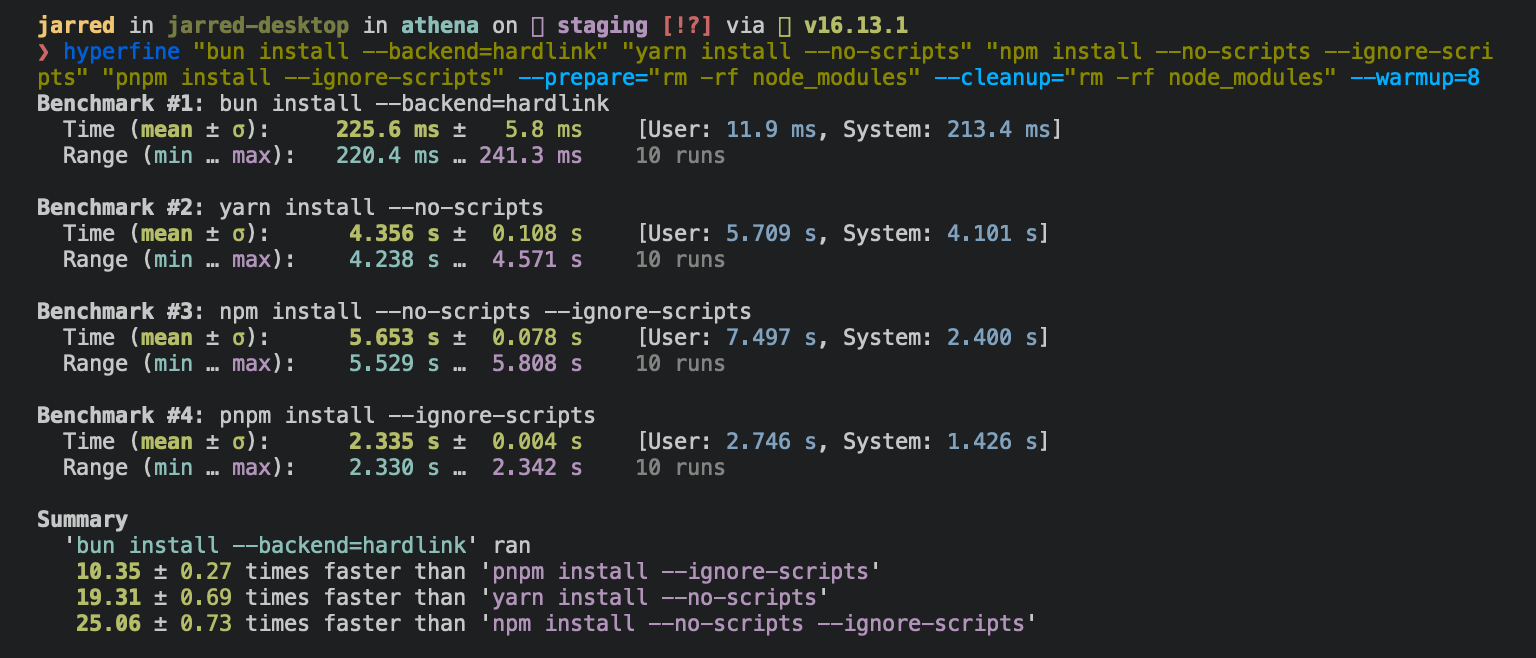
To install all dependencies of a project:
```bash terminal icon="terminal" theme={"theme":{"light":"github-light","dark":"dracula"}}
bun install
```
`bun install`:
* **Installs** all `dependencies`, `devDependencies`, and `optionalDependencies`. Bun installs `peerDependencies` by default.
* **Runs** your project's `{pre|post}install` and `{pre|post}prepare` scripts at the appropriate time. For security reasons Bun *does not execute* lifecycle scripts of installed dependencies.
* **Writes** a `bun.lock` lockfile to the project root.
***
## Logging
To modify logging verbosity:
```bash terminal icon="terminal" theme={"theme":{"light":"github-light","dark":"dracula"}}
bun install --verbose # debug logging
bun install --silent # no logging
```
***
## Lifecycle scripts
Unlike other npm clients, Bun does not execute arbitrary lifecycle scripts like `postinstall` for installed dependencies. Executing arbitrary scripts represents a potential security risk.
To tell Bun to allow lifecycle scripts for a particular package, add the package to `trustedDependencies` in your package.json.
```json package.json icon="file-json" theme={"theme":{"light":"github-light","dark":"dracula"}}
{
"name": "my-app",
"version": "1.0.0",
"trustedDependencies": ["my-trusted-package"] // [!code ++]
}
```
Then re-install the package. Bun reads this field and runs lifecycle scripts for `my-trusted-package`.
Lifecycle scripts run in parallel during installation. To adjust the maximum number of concurrent scripts, use the `--concurrent-scripts` flag. The default is two times the reported cpu count or GOMAXPROCS.
```bash terminal icon="terminal" theme={"theme":{"light":"github-light","dark":"dracula"}}
bun install --concurrent-scripts 5
```
Bun automatically optimizes postinstall scripts for popular packages (like `esbuild` and `sharp`) by determining which scripts need to run. To disable these optimizations:
```bash terminal icon="terminal" theme={"theme":{"light":"github-light","dark":"dracula"}}
BUN_FEATURE_FLAG_DISABLE_NATIVE_DEPENDENCY_LINKER=1 bun install
BUN_FEATURE_FLAG_DISABLE_IGNORE_SCRIPTS=1 bun install
```
***
## Workspaces
Bun supports `"workspaces"` in package.json. See [workspaces](/pm/workspaces).
```json package.json icon="file-json" theme={"theme":{"light":"github-light","dark":"dracula"}}
{
"name": "my-app",
"version": "1.0.0",
"workspaces": ["packages/*"], // [!code ++]
"dependencies": {
"preact": "^10.5.13"
}
}
```
***
## Installing dependencies for specific packages
In a monorepo, you can install the dependencies for a subset of packages using the `--filter` flag.
```bash terminal icon="terminal" theme={"theme":{"light":"github-light","dark":"dracula"}}
# Install dependencies for all workspaces except `pkg-c`
bun install --filter '!pkg-c'
# Install dependencies for only `pkg-a` in `./packages/pkg-a`
bun install --filter './packages/pkg-a'
```
See [filtering](/pm/filter#bun-install-and-bun-outdated).
***
## Overrides and resolutions
Bun supports npm's `"overrides"` and Yarn's `"resolutions"` in `package.json`. Both specify a version range for *metadependencies*, the dependencies of your dependencies. See [overrides and resolutions](/pm/overrides).
```json package.json icon="file-json" theme={"theme":{"light":"github-light","dark":"dracula"}}
{
"name": "my-app",
"dependencies": {
"foo": "^2.0.0"
},
"overrides": { // [!code ++]
"bar": "~4.4.0" // [!code ++]
} // [!code ++]
}
```
***
## Global packages
To install a package globally, use the `-g`/`--global` flag. Use it to install command-line tools.
```bash terminal icon="terminal" theme={"theme":{"light":"github-light","dark":"dracula"}}
bun install --global cowsay # or `bun install -g cowsay`
cowsay "Bun!"
```
```txt theme={"theme":{"light":"github-light","dark":"dracula"}}
______
< Bun! >
------
\ ^__^
\ (oo)\_______
(__)\ )\/\
||----w |
|| ||
```
***
## Production mode
To install in production mode (without `devDependencies` or `optionalDependencies`):
```bash terminal icon="terminal" theme={"theme":{"light":"github-light","dark":"dracula"}}
bun install --production
```
For reproducible installs, use `--frozen-lockfile`. Bun installs the exact versions specified in the lockfile and does not update it. If your `package.json` disagrees with `bun.lock`, Bun exits with an error.
```bash terminal icon="terminal" theme={"theme":{"light":"github-light","dark":"dracula"}}
bun install --frozen-lockfile
```
See [lockfile](/pm/lockfile) for more on `bun.lock`.
***
## Omitting dependencies
To omit dev, peer, or optional dependencies, use the `--omit` flag.
```bash terminal icon="terminal" theme={"theme":{"light":"github-light","dark":"dracula"}}
# Exclude "devDependencies" from the installation. This will apply to the
# root package and workspaces if they exist. Transitive dependencies will
# not have "devDependencies".
bun install --omit dev
# Install only dependencies from "dependencies"
bun install --omit=dev --omit=peer --omit=optional
```
***
## Dry run
To perform a dry run, without installing anything:
```bash terminal icon="terminal" theme={"theme":{"light":"github-light","dark":"dracula"}}
bun install --dry-run
```
***
## Non-npm dependencies
Bun supports installing dependencies from Git, GitHub, and local or remotely-hosted tarballs. See [`bun add`](/pm/cli/add).
```json package.json icon="file-json" theme={"theme":{"light":"github-light","dark":"dracula"}}
{
"dependencies": {
"dayjs": "git+https://github.com/iamkun/dayjs.git",
"lodash": "git+ssh://github.com/lodash/lodash.git#4.17.21",
"moment": "git@github.com:moment/moment.git",
"zod": "github:colinhacks/zod",
"react": "https://registry.npmjs.org/react/-/react-18.2.0.tgz",
"bun-types": "npm:@types/bun"
}
}
```
***
## Installation strategies
Bun supports two package installation strategies that determine how dependencies are organized in `node_modules`:
### Hoisted installs
The traditional npm/Yarn approach that flattens dependencies into a shared `node_modules` directory:
```bash terminal icon="terminal" theme={"theme":{"light":"github-light","dark":"dracula"}}
bun install --linker hoisted
```
### Isolated installs
A pnpm-like approach that creates strict dependency isolation to prevent [phantom dependencies](/pm/isolated-installs), packages that can be imported without being declared in `package.json`:
```bash terminal icon="terminal" theme={"theme":{"light":"github-light","dark":"dracula"}}
bun install --linker isolated
```
Isolated installs create a central package store in `node_modules/.bun/` with symlinks in the top-level `node_modules`. This ensures packages can only access their declared dependencies.
### Default strategy
The default linker strategy depends on whether you're starting fresh or have an existing project:
* **New workspaces/monorepos**: `isolated` (prevents phantom dependencies)
* **New single-package projects**: `hoisted` (traditional npm behavior)
* **Existing projects (made pre-v1.3.2)**: `hoisted` (preserves backward compatibility)
The default is controlled by a `configVersion` field in your lockfile. For a detailed explanation, see [isolated installs](/pm/isolated-installs).
***
## Minimum release age
To protect against supply chain attacks where malicious packages are quickly published, you can configure a minimum age requirement for npm packages. Bun filters out package versions published more recently than the specified threshold (in seconds) during installation.
```bash terminal icon="terminal" theme={"theme":{"light":"github-light","dark":"dracula"}}
# Only install package versions published at least 3 days ago
bun add @types/bun --minimum-release-age 259200 # seconds
```
You can also configure this in `bunfig.toml`:
```toml bunfig.toml icon="settings" theme={"theme":{"light":"github-light","dark":"dracula"}}
[install]
# Only install package versions published at least 3 days ago
minimumReleaseAge = 259200 # seconds
# Exclude trusted packages from the age gate
minimumReleaseAgeExcludes = ["@types/node", "typescript"]
```
When the minimum age filter is active:
* It only affects new package resolution; existing packages in `bun.lock` remain unchanged
* All dependencies (direct and transitive) are filtered to meet the age requirement when resolved
* When versions are blocked by the age gate, a stability check detects rapid bugfix patterns
* If multiple versions were published close together just outside your age gate, Bun extends the filter to skip those potentially unstable versions and selects an older, more mature version
* The check searches up to 7 days past the age gate; if releases are still rapid beyond that, Bun ignores the stability check
* Exact version requests (like `package@1.1.1`) still respect the age gate but bypass the stability check
* Versions without a `time` field are treated as passing the age check (the npm registry should always provide timestamps)
For more advanced security scanning, including integration with services and custom filtering, see the [Security Scanner API](/pm/security-scanner-api).
***
## Configuration
### Configuring `bun install` with `bunfig.toml`
On `bun install`, `bun remove`, and `bun add`, Bun looks for `bunfig.toml` in:
1. `$XDG_CONFIG_HOME/.bunfig.toml` or `$HOME/.bunfig.toml`
2. `./bunfig.toml`
If both are found, the results are merged together.
Configuring with `bunfig.toml` is optional. These are the default values:
```toml bunfig.toml icon="settings" theme={"theme":{"light":"github-light","dark":"dracula"}}
[install]
# whether to install optionalDependencies
optional = true
# whether to install devDependencies
dev = true
# whether to install peerDependencies
peer = true
# equivalent to `--production` flag
production = false
# equivalent to `--save-text-lockfile` flag
saveTextLockfile = false
# equivalent to `--frozen-lockfile` flag
frozenLockfile = false
# equivalent to `--dry-run` flag
dryRun = false
# equivalent to `--concurrent-scripts` flag
concurrentScripts = 16 # (cpu count or GOMAXPROCS) x2
# installation strategy: "hoisted" or "isolated"
# default depends on lockfile configVersion and workspaces:
# - configVersion = 1: "isolated" if using workspaces, otherwise "hoisted"
# - configVersion = 0: "hoisted"
linker = "hoisted"
# minimum age config
minimumReleaseAge = 259200 # seconds
minimumReleaseAgeExcludes = ["@types/node", "typescript"]
```
### Configuring with environment variables
Environment variables take priority over `bunfig.toml`.
| Name | Description |
| ---------------------------------- | --------------------------------------------------------------------------------------- |
| `BUN_CONFIG_REGISTRY` | Set an npm registry (default: [https://registry.npmjs.org](https://registry.npmjs.org)) |
| `BUN_CONFIG_TOKEN` | Set an auth token (currently does nothing) |
| `BUN_CONFIG_YARN_LOCKFILE` | Save a Yarn v1-style yarn.lock |
| `BUN_CONFIG_LINK_NATIVE_BINS` | Point `bin` in package.json to a platform-specific dependency |
| `BUN_CONFIG_SKIP_SAVE_LOCKFILE` | Don’t save a lockfile |
| `BUN_CONFIG_SKIP_LOAD_LOCKFILE` | Don’t load a lockfile |
| `BUN_CONFIG_SKIP_INSTALL_PACKAGES` | Don’t install any packages |
Bun uses the fastest installation method available on the target platform: `clonefile` on macOS and `hardlink` on Linux. You can change the installation method with the `--backend` flag. When unavailable or on error, `clonefile` and `hardlink` fall back to a platform-specific implementation of copying files.
Bun stores installed packages from npm in `~/.bun/install/cache/${name}@${version}`. If the semver version has a `build` or a `pre` tag, Bun replaces it with a hash of that value. This reduces the chances of errors from long file paths, but complicates figuring out where a package was installed on disk.
When the `node_modules` folder exists, Bun decides whether to install a package by checking that the `"name"` and `"version"` in its `package.json` at the expected `node_modules` location match the expected name and version. It uses a custom JSON parser which stops parsing as soon as it finds `"name"` and `"version"`.
When a `bun.lock` doesn’t exist or `package.json` has changed dependencies, Bun downloads and extracts tarballs eagerly while resolving.
When a `bun.lock` exists and `package.json` hasn’t changed, Bun downloads missing dependencies lazily. If the package with a matching `name` and `version` already exists in the expected location within `node_modules`, Bun won’t attempt to download the tarball.
## CI/CD
Use the official [`oven-sh/setup-bun`](https://github.com/oven-sh/setup-bun) action to install `bun` in a GitHub Actions pipeline:
```yaml .github/workflows/release.yml icon="file-code" theme={"theme":{"light":"github-light","dark":"dracula"}}
name: bun-types
jobs:
build:
name: build-app
runs-on: ubuntu-latest
steps:
- name: Checkout repo
uses: actions/checkout@v4
- name: Install bun
uses: oven-sh/setup-bun@v2
- name: Install dependencies
run: bun install
- name: Build app
run: bun run build
```
For CI/CD environments that want to enforce reproducible builds, use `bun ci` to fail the build if the package.json is out of sync with the lockfile:
```bash terminal icon="terminal" theme={"theme":{"light":"github-light","dark":"dracula"}}
bun ci
```
`bun ci` is equivalent to `bun install --frozen-lockfile`. It installs exact versions from `bun.lock` and fails if `package.json` doesn't match the lockfile. To use `bun ci` or `bun install --frozen-lockfile`, you must commit `bun.lock` to version control.
In your workflow, run `bun ci` instead of `bun install`:
```yaml .github/workflows/release.yml icon="file-code" theme={"theme":{"light":"github-light","dark":"dracula"}}
name: bun-types
jobs:
build:
name: build-app
runs-on: ubuntu-latest
steps:
- name: Checkout repo
uses: actions/checkout@v4
- name: Install bun
uses: oven-sh/setup-bun@v2
- name: Install dependencies
run: bun ci
- name: Build app
run: bun run build
```
## Platform-specific dependencies?
Bun stores normalized `cpu` and `os` values from npm in the lockfile, along with the resolved packages. It skips downloading, extracting, and installing packages disabled for the current target at runtime. This means the lockfile won't change between platforms/architectures even if the packages ultimately installed do change.
### `--cpu` and `--os` flags
You can override the target platform for package selection:
```bash theme={"theme":{"light":"github-light","dark":"dracula"}}
bun install --cpu=x64 --os=linux
```
These flags install packages for the specified platform instead of the current system. Use them for cross-platform builds or when preparing deployments for different environments.
**Accepted values for `--cpu`**: `arm64`, `x64`, `ia32`, `ppc64`, `s390x`
**Accepted values for `--os`**: `linux`, `darwin`, `win32`, `freebsd`, `openbsd`, `sunos`, `aix`
## Peer dependencies?
Bun handles peer dependencies like Yarn: `bun install` installs them automatically. If the dependency is marked optional in `peerDependenciesMeta`, Bun uses an existing dependency if possible.
## Lockfile
`bun.lock` is Bun’s lockfile format. See [our blog post about the text lockfile](https://bun.com/blog/bun-lock-text-lockfile).
Prior to Bun 1.2, the lockfile was binary and called `bun.lockb`. To upgrade an old lockfile to the new format, run `bun install --save-text-lockfile --frozen-lockfile --lockfile-only`, then delete `bun.lockb`.
## Cache
To delete the cache:
```bash theme={"theme":{"light":"github-light","dark":"dracula"}}
bun pm cache rm
# or
rm -rf ~/.bun/install/cache
```
## Platform-specific backends
For performance, `bun install` uses different system calls to install dependencies depending on the platform. You can force a specific backend with the `--backend` flag.
**`hardlink`** is the default backend on Linux. Benchmarking showed it to be the fastest on Linux.
```bash theme={"theme":{"light":"github-light","dark":"dracula"}}
rm -rf node_modules
bun install --backend hardlink
```
**`clonefile`** is the default backend on macOS. Benchmarking showed it to be the fastest on macOS. It is only available on macOS.
```bash theme={"theme":{"light":"github-light","dark":"dracula"}}
rm -rf node_modules
bun install --backend clonefile
```
**`clonefile_each_dir`** is similar to `clonefile`, except it clones each file individually per directory. It is only available on macOS and tends to perform slower than `clonefile`. Unlike `clonefile`, this does not recursively clone subdirectories in one system call.
```bash theme={"theme":{"light":"github-light","dark":"dracula"}}
rm -rf node_modules
bun install --backend clonefile_each_dir
```
**`copyfile`** is the fallback used when any of the above fail, and is the slowest. On macOS, it uses `fcopyfile()`; on Linux, it uses `copy_file_range()`.
```bash theme={"theme":{"light":"github-light","dark":"dracula"}}
rm -rf node_modules
bun install --backend copyfile
```
**`symlink`** is typically only used for `file:` dependencies (and eventually `link:`) internally. To prevent infinite loops, it skips symlinking the `node_modules` folder.
If you install with `--backend=symlink`, Node.js won't resolve node\_modules of dependencies unless each dependency has its own node\_modules folder or you pass `--preserve-symlinks` to `node` or `bun`. See [Node.js documentation on `--preserve-symlinks`](https://nodejs.org/api/cli.html#--preserve-symlinks).
```bash theme={"theme":{"light":"github-light","dark":"dracula"}}
rm -rf node_modules
bun install --backend symlink
bun --preserve-symlinks ./my-file.js
node --preserve-symlinks ./my-file.js # https://nodejs.org/api/cli.html#--preserve-symlinks
```
## npm registry metadata
Bun uses a binary format for caching npm registry responses. This loads much faster than JSON and tends to be smaller on disk.
These files live in `~/.bun/install/cache/*.npm`. The filename pattern is `${hash(packageName)}.npm`. It’s a hash so that extra directories don’t need to be created for scoped packages.
Bun's usage of `Cache-Control` ignores `Age`. This improves performance, but means Bun may be about 5 minutes behind the latest package version metadata from npm.
## pnpm migration
Bun migrates projects from pnpm automatically. When a `pnpm-lock.yaml` file is detected and no `bun.lock` file exists, Bun converts the lockfile to `bun.lock` during installation. The original `pnpm-lock.yaml` file remains unmodified.
```bash terminal icon="terminal" theme={"theme":{"light":"github-light","dark":"dracula"}}
bun install
```
Migration only runs when `bun.lock` is absent. There is currently no opt-out flag for pnpm migration.
The migration process handles:
### Lockfile Migration
* Converts `pnpm-lock.yaml` to `bun.lock` format
* Preserves package versions and resolution information
* Maintains dependency relationships and peer dependencies
* Handles patched dependencies with integrity hashes
### Workspace Configuration
When a `pnpm-workspace.yaml` file exists, Bun migrates workspace settings to your root `package.json`:
```yaml pnpm-workspace.yaml icon="file-code" theme={"theme":{"light":"github-light","dark":"dracula"}}
packages:
- "apps/*"
- "packages/*"
catalog:
react: ^18.0.0
typescript: ^5.0.0
catalogs:
build:
webpack: ^5.0.0
babel: ^7.0.0
```
Bun moves the workspace packages list and catalogs to the `workspaces` field in `package.json`:
```json package.json icon="file-json" theme={"theme":{"light":"github-light","dark":"dracula"}}
{
"workspaces": {
"packages": ["apps/*", "packages/*"],
"catalog": {
"react": "^18.0.0",
"typescript": "^5.0.0"
},
"catalogs": {
"build": {
"webpack": "^5.0.0",
"babel": "^7.0.0"
}
}
}
}
```
### Catalog Dependencies
Dependencies using pnpm's `catalog:` protocol are preserved:
```json package.json icon="file-json" theme={"theme":{"light":"github-light","dark":"dracula"}}
{
"dependencies": {
"react": "catalog:",
"webpack": "catalog:build"
}
}
```
### Configuration Migration
Bun migrates the following pnpm configuration from both `pnpm-lock.yaml` and `pnpm-workspace.yaml`:
* **Overrides**: Moved from `pnpm.overrides` to root-level `overrides` in `package.json`
* **Patched Dependencies**: Moved from `pnpm.patchedDependencies` to root-level `patchedDependencies` in `package.json`
* **Workspace Overrides**: Applied from `pnpm-workspace.yaml` to root `package.json`
### Requirements
* Requires pnpm lockfile version 7 or higher
* Workspace packages must have a `name` field in their `package.json`
* All catalog entries referenced by dependencies must exist in the catalogs definition
After migration, you can safely remove `pnpm-lock.yaml` and `pnpm-workspace.yaml` files.
***
## CLI Usage
```sh terminal icon="terminal" theme={"theme":{"light":"github-light","dark":"dracula"}}
bun install @
```
### General Configuration
Specify path to config file (bunfig.toml)
Set a specific cwd
### Dependency Scope & Management
Don't install devDependencies
Don't update package.json or save a lockfile
Save to package.json
Exclude 'dev', 'optional', or 'peer' dependencies from install
Only add dependencies to package.json if they are not already present
### Dependency Type & Versioning
Add dependency to "devDependencies"
Add dependency to "optionalDependencies"
Add dependency to "peerDependencies"
Add the exact version instead of the ^ range
### Lockfile Control
Write a yarn.lock file (yarn v1)
Disallow changes to lockfile
Save a text-based lockfile
Generate a lockfile without installing dependencies
### Network & Registry Settings
Provide a Certificate Authority signing certificate
File path to Certificate Authority signing certificate
Use a specific registry by default, overriding .npmrc, bunfig.toml and environment variables
### Installation Process Control
Don't install anything
Always request the latest versions from the registry & reinstall all dependencies
Install globally
Platform-specific optimizations: "clonefile", "hardlink", "symlink", "copyfile"
Install packages for the matching workspaces
Recursively analyze & install all dependencies of files passed as arguments
### Caching Options
Store & load cached data from a specific directory path
Ignore manifest cache entirely
### Output & Logging
Don't log anything
Excessively verbose logging
Disable the progress bar
Don't print a summary
### Security & Integrity
Skip verifying integrity of newly downloaded packages
Add to trustedDependencies in the project's package.json and install the package(s)
### Concurrency & Performance
Maximum number of concurrent jobs for lifecycle scripts
Maximum number of concurrent network requests
### Lifecycle Script Management
Skip lifecycle scripts in the project's package.json (dependency scripts are never run)
### Help Information
Print this help menu